Hello World! with BBC micro:bit is a facilitator-supported Kasa Future Makers course. Learners can explore activities online using the MakeCode simulator, but Kasa recommends facilitator support for the full hands-on experience — especially when learners use real micro:bit devices in workshops, schools, or community programs. My Academy tracks progress, checklists, reflections, and completion.
This page and its resources are open to everyone — no account needed. Sign in only if you want to save your progress, submit reflections, or earn the Knowledge Check badge.
You will build your code in Microsoft MakeCode for micro:bit. Open MakeCode, create your project, test it in the simulator or download it to your micro:bit, then return to Kasa Learning Academy to complete your checklist and reflection.
The coding editor is external — it opens in a new tab on makecode.microbit.org. It is not part of Kasa Learning Academy. Your progress, checklist, and reflection stay here in the Academy.
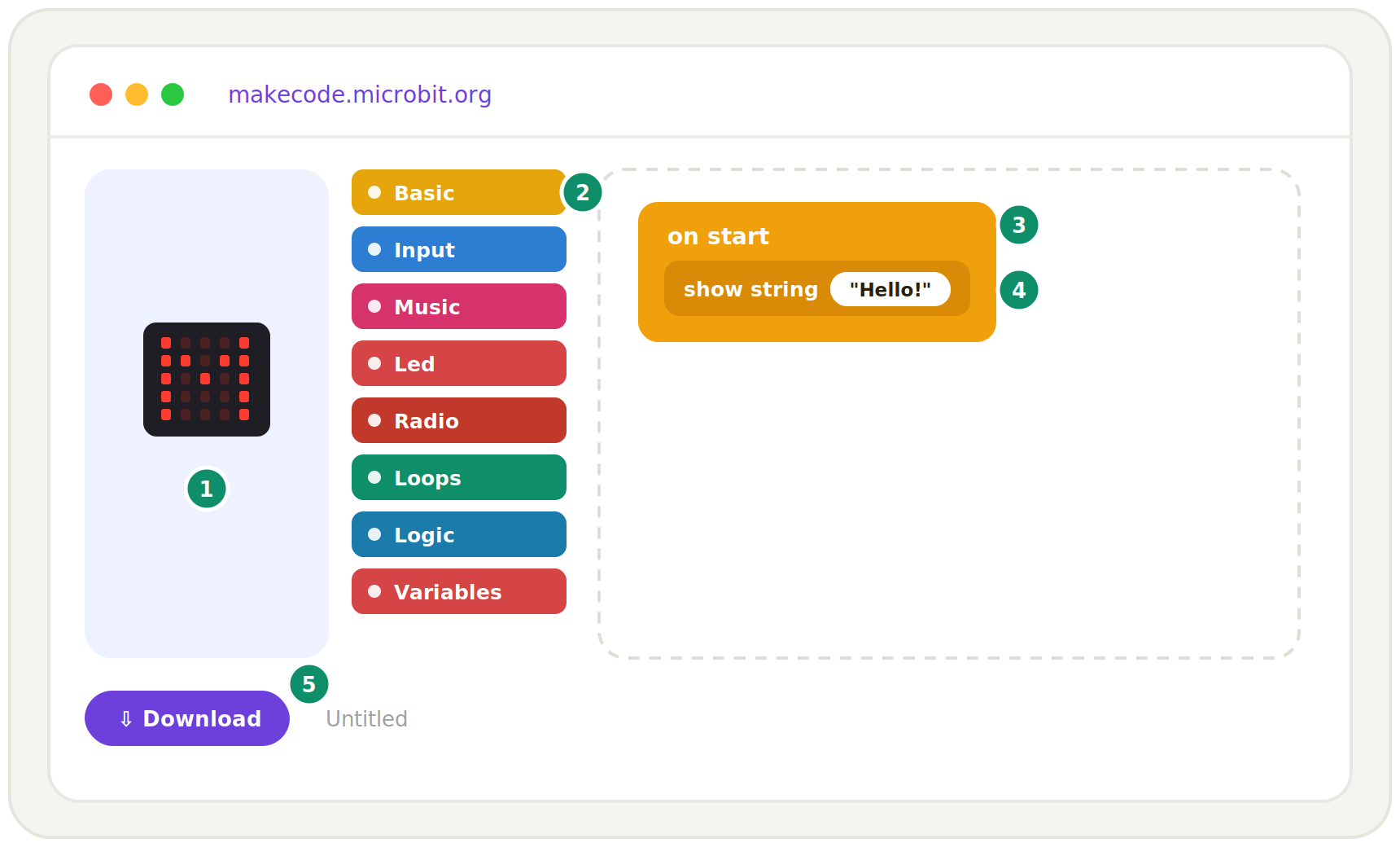
Simulator — the virtual micro:bit on the left of the screen. It runs your program automatically so you can test it without hardware.
2
Basic — the yellow block category on the left toolbox. Click it to see blocks like show string, show icon, and forever.
3
on start — the block already sitting in the workspace when you open a new project. Anything inside it runs once when the micro:bit turns on.
4
show string — inside the Basic category. Drag it into on start and type your message (for example: ‘Hello!’).
5
Download — the purple button at the bottom left. Click it to save your program as a .hex file and copy it to your micro:bit.
⚑ FACILITATOR-SUPPORTED COURSE
Explore online, or go deeper with a facilitator
On your own — simulator only
Anyone can open MakeCode and try the activities in the on-screen simulator. No device required. Great for a first taste of block coding and micro:bit.
With a real micro:bit
Learners with a physical BBC micro:bit can connect it by USB, download their program, and test it on the device.
In-country delivery — facilitator-supported
For schools, community centers, and youth programs, Kasa recommends running Hello World! with a trained facilitator. Facilitators help learners with devices, USB cables, MakeCode, troubleshooting, group work, safety, and reflection.
FACILITATOR NOTE
Before this session, confirm that devices, USB cables, laptops, internet access, and MakeCode access are ready. Pair learners where needed and support troubleshooting during download and testing.
Curriculum overview
Curriculum overview
Every module below is public — explore the pathway freely. Sign in only if you want to save progress or earn the Knowledge Check badge.
Curriculum is being seeded — check back soon.
How the module works
Every Hello World! activity keeps learners inside the Academy — MakeCode is only the coding workspace where they build the micro:bit project.
01
ACADEMY
Read the lesson in the Academy
02
ACADEMY
Read the lesson in the Academy
03
MAKECODE
Read the lesson in the Academy
04
ACADEMY
Read the lesson in the Academy
Blocks → JavaScript → Python
Start visual, then level up to real JavaScript and Python — all in the same editor.
Real hardware
Program the BBC micro:bit — buttons, LEDs, accelerometer, compass, and sensors.
Connect & compete
Use radio to talk between devices, build multiplayer games, wearables, and IoT builds.
What a session looks like
Warm up with a mini challenge (step counter, reaction game, secret radio)
Build the week’s project in MakeCode and flash it to the micro:bit
Remix, debug, and demo what you built to the group
MAKE · CODE · SHIP
CURRICULUM OVERVIEW
Hello World Activity Pathway
A public sequence of Hello World! activities that facilitators, families, and learners can explore freely — no My Academy account required.
1
Meet the micro:bit
Look closely at the device: 25 LEDs, buttons A and B, and a USB port.
Two free, plain-language guides for families — no coding experience needed. Understand what your learner is building and get simple ways to encourage them at home.
Microsoft MakeCode for micro:bit is the external coding workspace used inside Hello World! lessons. It is a tool — not the course platform, and not a shared Kasa account.
This opens Microsoft MakeCode, the coding workspace used for the micro:bit activity. After completing the coding activity, learners return to the Kasa Learning Academy to submit their reflection and complete the lesson.
Hello World! uses Microsoft MakeCode as the coding workspace for BBC micro:bit activities. Kasa Foundation organizes the learner experience, facilitation, reflection, assignments, and local delivery through the Kasa Learning Academy.